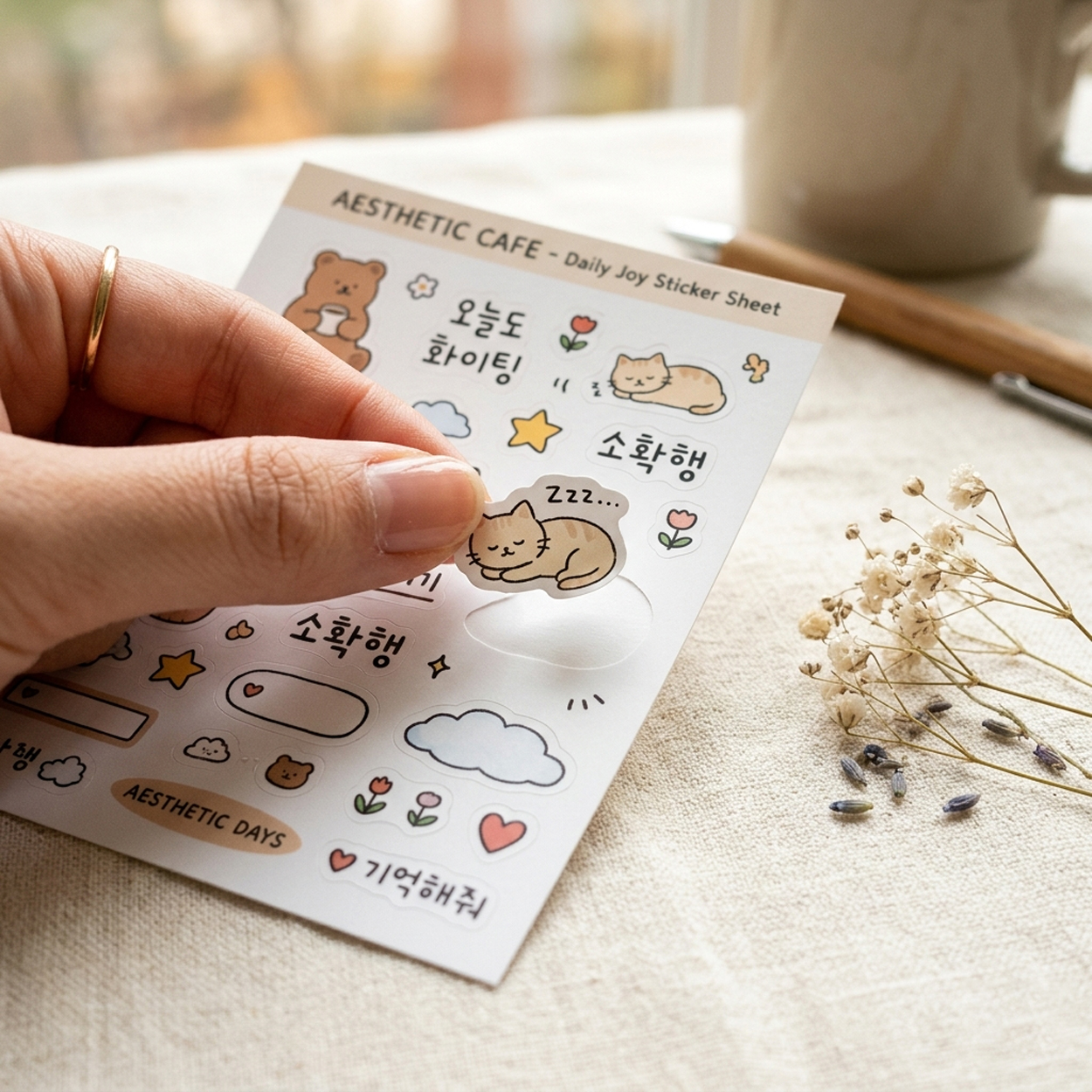
Top quality, fair prices — get your quote now
Upload File
Only 1 file can be uploaded.
For multiple files, please compress into a zip file.
File Name File Size
Upload File

Drag and drop your file here, or
click to upload.

Stickers > Offset Printing > Kiss-Cut Stickers

Printed colors may differ from actual colors depending on your monitor and resolution.
Size
  • Kiss-Cut Line Size
  • Width
  •  x 
  • Height
  • mm
  • Trim Size
  • Width
  •  x 
  • Height
  • mm
Paper Stock
Print Color
Quantity
  • sheets
  •  x 
  • types
Coating
Kiss-Cut Line Shape
Rectangular shape.
Finish Cut
Delivery Estimated delivery is 3–5 business days from design preview approval and print start date.
If finishing is included, add 1–3 extra business days.


We'll do our best to meet the estimated delivery date, but it may be delayed depending on our production schedule.

Estimated delivery is based on Korean business days. Delivery may be delayed due to public holidays or customs processing in the destination country.
Pre-Order Notice
Color
Here are some helpful tips about print colors.
1. Printed colors will appear darker and less vivid than on your monitor.
Printing uses CMYK ink mixing, which works differently from the RGB light on your screen. An exact match between monitor and print is technically not possible.
Files submitted in Spot Color or RGB mode will be automatically converted to CMYK. This conversion results in noticeable color shifts.
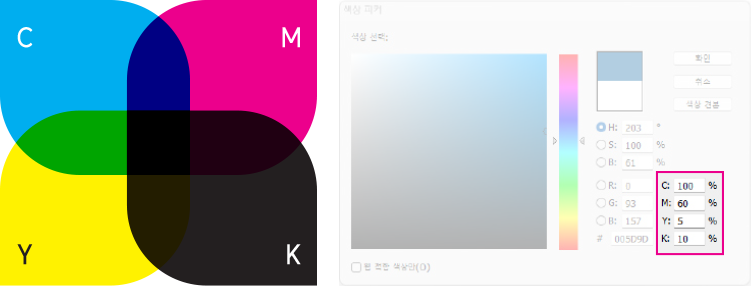
CMYK 4 Process Colors
In gang-run printing, colors may print lighter or darker, and variation between C (Cyan), M (Magenta), Y (Yellow), and K (Black) channels is within normal range.
  • Even with the same file, color results vary depending on paper type and print timing. This does not constitute grounds for remake.
  • Gang-run printing processes multiple orders on a single press sheet, making precise color control structurally not possible.
  • Large areas of dark background color may show roller marks, resulting in uneven color.
  • The front and back sides will appear different in tone, even when the same color is used in the design file.
  • If exact color accuracy is essential, please provide a printed reference sample, place a dedicated-run order with press supervision, or contact our support team.
  • Gang-run products include: Business Cards, Hang Tags, Coupons, Leaflets, Square-Cut Stickers, Kiss-Cut Stickers, Standard Envelopes, and Flyers.
2. Colors with similar CMYK ratios or sensitive tones may print very differently.
Small differences in CMYK values can result in noticeably different printed colors. Color claims are evaluated based on your submitted file only, not the printed result.
Color deviation example:
Color deviation example: C=61%, M=52%, Y=52%, K=22%
  • When using sensitive colors with similar CMYK ratios — especially olive, gray, and brown tones — as a background on large areas, there is a very high chance of ink drift causing uneven, gradient-like variations within the same area.
  • In gang-run printing, multiple orders are placed on a single plate, so ink supply is affected by the color ratios of surrounding jobs. This same variation will occur even with reprints.
  • This is an inherent characteristic of gang-run printing and does not constitute a defect or grounds for remake.
3. K=100% black is processed with overprint enabled.
If you do not want overprint applied, add 1% of another color to the black, or set the value to K=99%.
Overprint K=100%
< Overprint K=100% >
Overprint Off
< Overprint Off >
Rich Black (C=30% + M=30%)
< Rich Black (C=30% + M=30%) >
< Overprint Example >
4. Patterns and textures require sufficient contrast with the background.
We recommend at least 20–30% color difference from the background.
Color difference 10%
< Color difference 10% >
Color difference 20% or more
< Color difference 20% or more >
< Patterns & Textures >
5. Use caution with text and lines made of mixed CMYK colors.
  • Slight misregistration between color plates may cause colors to spread or shift. This is more noticeable with thinner text and lines.
  • On dark backgrounds made of mixed CMYK colors, misregistration can cause thin elements to break up or disappear entirely.
  • For black text and lines, use pure black (K=100%) only. Do not use a mix of CMYK colors.
  • Even in a single color, extremely thin text or lines may not reproduce clearly in print.
6. Total CMYK ink coverage should be kept below 250%.
  • Higher ink density increases the risk of set-off (wet ink transferring onto adjacent sheets).
  • Pages may stick together, or ink may peel away from the surface.
  • For deeper tones, increase the K (Black) percentage rather than raising CMY values.
  • Depending on paper type and printing method, set-off can occur even below 250%.
  • Very high ink density may result in muddy dark tones or visible roller marks.
7. White ink printing is not fully opaque.
On transparent materials, show-through occurs in white ink printing. This is within normal range.
Finishing — Die-Cut
Please note the following for die-cutting.
When the die line shape is very complex
  • Due to technical limitations in die production, the die line may be modified within feasible limits. Modified die lines are not eligible for rework, claims, or refunds.
  • Modifications may be more significant for sizes 50×50mm (1.969×1.969 inch) or smaller.
  • Modified die lines cannot be provided in advance. (Pre-approval is available for dedicated-run orders.)
Finishing — Die-Cut Die Line
Die-Cut Tolerance
A tolerance of ±1–2mm (0.039–0.079 inch) is considered standard in the industry.
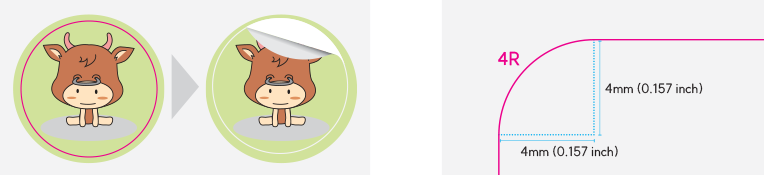
For smooth rounded corners
We recommend a corner radius of at least 4mm (0.157 inch).
Quality Inspection (Peel Test)
After die-cutting, random samples are selected from the production run for peel testing.
  • PASS - If the backing paper separates cleanly in at least one direction, the product is deemed acceptable.
  • FAIL - Only when the backing paper tears in all directions is the product deemed defective, and the entire production run is reworked.
※ Minor variations due to blade depth may occur, but as long as the backing separates cleanly in one direction, the product is fully usable.
Adhesion Strength
Important information regarding sticker adhesion.
Adhesion performance varies by environment.
  • Sticker adhesion depends not only on the material manufacturer's specifications, but also on the surface material, temperature, humidity, and other environmental conditions of the application.
  • Even with the same material, adhesion properties may change over time after application. Please choose the appropriate material for your intended use.
We recommend testing with a small order instead of sample books.
  • Since adhesion performance changes over time, testing with an actual production run is more accurate than using sample books that may have been produced long ago.
  • Our production costs are reasonable, so we recommend placing a minimum quantity order to test in your actual environment before committing to a large run.
Important notice for bulk orders
  • Adhesion-related issues for bulk orders placed without prior testing are not eligible for exchange or refund.
Trimming
Important information for sticker trimming.
General
  • Large quantities are trimmed at once, which may cause slippage. A tolerance of ±1–3mm is considered standard in the industry.
  • Keep important content at least 3mm inside the die line on all sides.
  • Borders and symmetrical designs may not be trimmed evenly.
  • Slippage may cause slight diagonal cuts.
Standard Cut
  • The product may be trimmed with trim marks visible, or trimmed arbitrarily within the non-cut area.
  • Multiple stickers may remain connected on a single sheet.
  • If you need individually separated stickers, please select Exact-Size Cut.
Quantity
Quantity information for gang-run printing.
With gang-run printing, small quantity shortages can happen — most of the time we keep it within 5%. In rare cases, depending on production conditions like the ink density of other orders running at the same time, shortages of around 10% may occur.
If a significant shortage occurs, please contact us through our 1:1 inquiry.
  • Gang-run products include: Business Cards, Hang Tags, Coupons, Leaflets, Square-Cut Stickers, Kiss-Cut Stickers, Standard Envelopes, and Flyers.
  • If finishing is included, additional waste sheets are generated, which may result in a larger shortage.
  • If you require an exact quantity, please use dedicated-run printing.
Software Setup Guide
InDesign InDesign
Size Setup
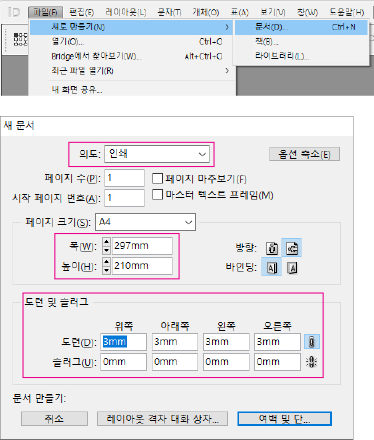
Select New and set the size for your print product. Set the page size to the trim size, and set the bleed in the Bleed section.
File → New → Document (Ctrl+N)
Intent: Print | Page Size: A4 (210×297mm) | Bleed: 3mm (all sides) | Slug: 0mm
Size Setup
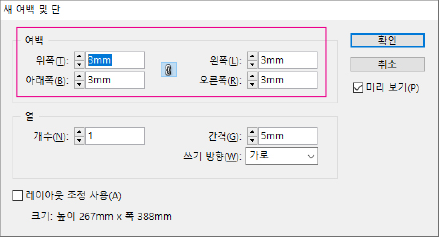
Margin Setup
Set the safety zone in the Margins and Columns dialog. For small products (business cards, hang tags, coupons), use 3mm margins. For larger products (flyers, brochures, catalogs), use 5mm or more.
Layout → Margins and Columns
Margins: 3mm (all sides)
Margin Setup
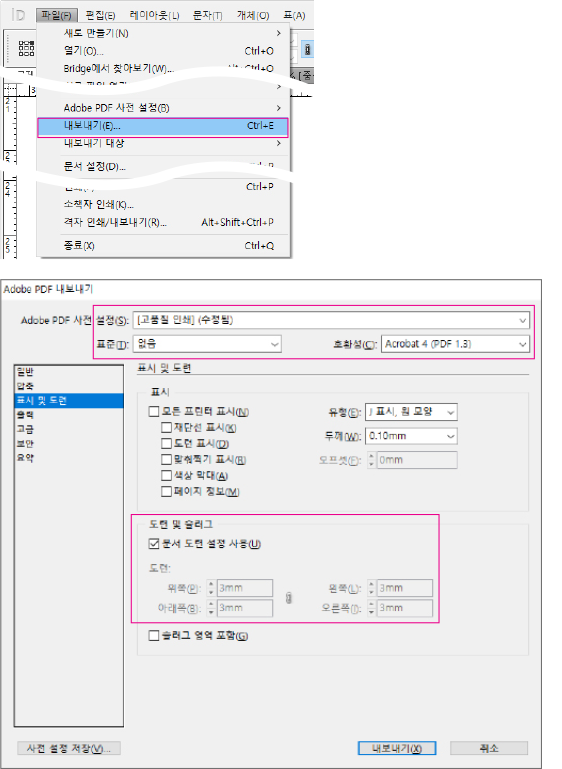
PDF Export
After completing your work, export as PDF with the following settings.
File → Export (Ctrl+E)
Format: Adobe PDF (Print) | Preset: PDF/X-4:2008 | Marks and Bleeds: Use Document Bleed Settings
PDF Export
Illustrator Illustrator
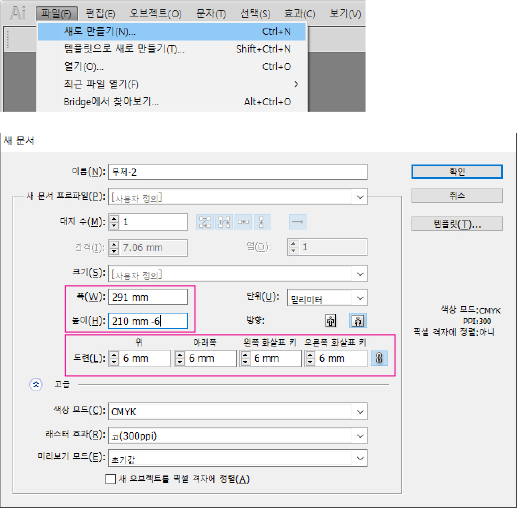
Size Setup
Select New and set the size for your print product. Set the width and height based on the safety zone size. The trim size adds 3mm to each side (if using 3mm safety zone). The design size adds 6mm total. For small products (business cards, hang tags, coupons), use 3mm safety zone. For larger products (flyers, brochures, catalogs), use 5mm or more.
File → New (Ctrl+N)
Width: 297mm, Height: 210mm + 6mm | Bleed: 6mm (all sides) | Color Mode: CMYK | Raster Effects: High (300 ppi)
Size Setup
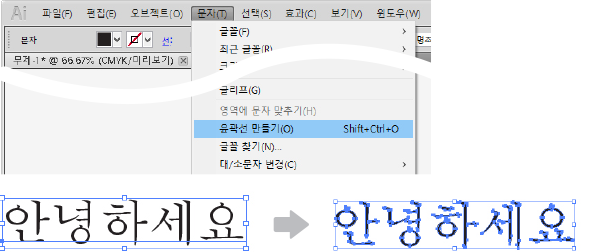
Convert Fonts to Outlines
All fonts must be converted to outlines.
Type → Create Outlines (Shift+Ctrl+O)
Convert Fonts to Outlines
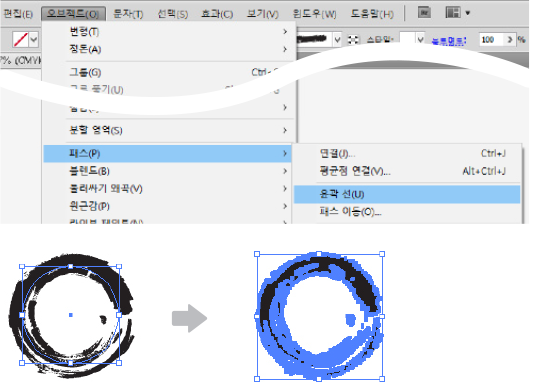
Outline Stroke
All strokes must be converted to outlines.
Object → Path → Outline Stroke
Outline Stroke
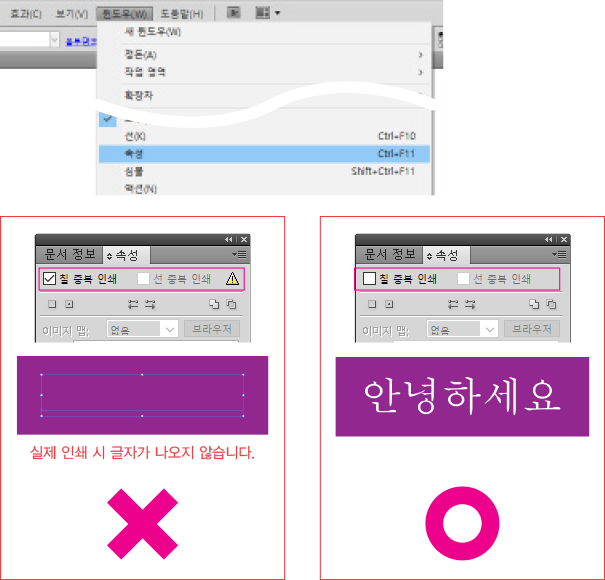
Overprint
Make sure to uncheck all overprint settings for fills and strokes.
Window → Attributes (Ctrl+F11)
Overprint Fill: unchecked | Overprint Stroke: unchecked
Overprint
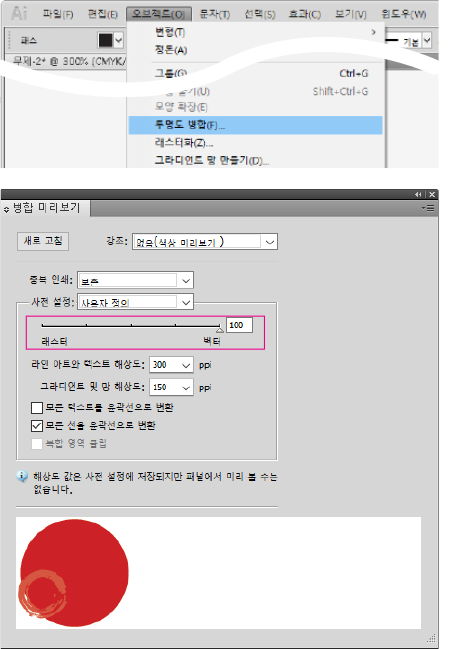
Transparency
Artwork using transparency must be flattened (100% vector).
Object → Flatten Transparency
Raster/Vector Balance: 100 (Vector) | Line Art and Text Resolution: 300 ppi | Gradient and Mesh Resolution: 150 ppi | Convert All Strokes to Outlines: checked
Transparency
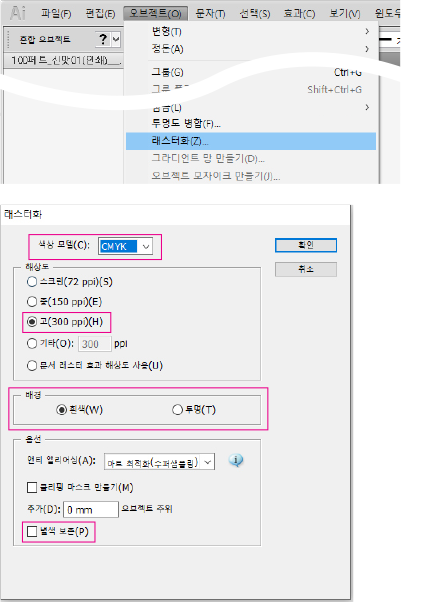
Rasterize
Any gradients, transparency effects, or other effects must be rasterized.
Object → Rasterize
Color Model: CMYK | Resolution: High (300 ppi) | Background: White / Transparent
Rasterize
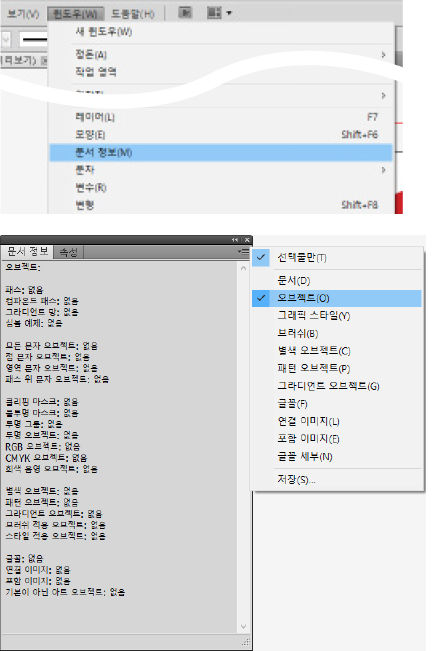
Document Info Check
Check Document Info for potential print issues. Click Objects in the Document Info panel menu. All items should show "None" — if any show a number (2, 5, etc.), locate and fix those objects using the methods above.
Window → Document Info
Panel menu (☰) → Objects
Document Info Check
Photoshop Photoshop
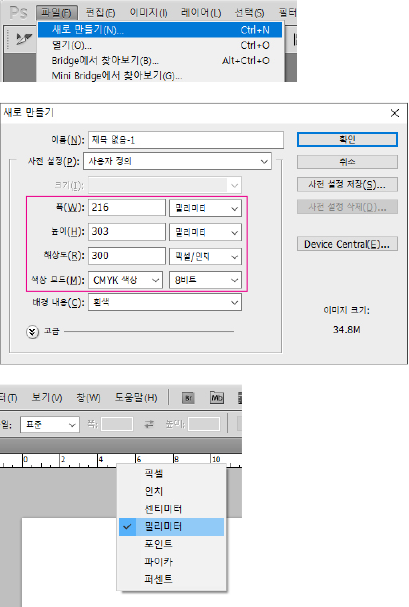
Size Setup
Select New and set the size for your print product. Set resolution to 300 pixels/inch or higher, and color mode to CMYK. Note: Upscaling a low-resolution source will not improve quality. If your work was done at low resolution, you must recreate it from scratch at high resolution.
File → New (Ctrl+N)
Width: 216mm, Height: 303mm | Resolution: 300 Pixels/Inch | Color Mode: CMYK Color, 8 bit | Background Contents: White
Right-click ruler → Millimeters (or Edit → Preferences → Units & Rulers)
Size Setup
Order Cancellation and Refund
Here is the refund policy for custom-made products.
As all products are custom-manufactured, refunds due to a simple change of mind are not available once production has begun.
If a defect caused by our error is confirmed, please file a claim through our 1:1 inquiry within 5 days of receiving the product. Defect determination is based on our quality standards.
Print errors caused by mistakes in the submitted file are entirely the responsibility of the customer and are not eligible for remake or refund.
Defect determination is based on our quality standards, using a comparison between the submitted file and the printed result.
To request a cancellation, please contact us through our 1:1 inquiry.
Before proof approval
  • Full refund available.
During production
  • Refund amount varies depending on production progress and is calculated based on our internal policy.
Before shipment
  • Product cost is non-refundable. Only shipping fees are refundable for unshipped orders.
KR Domestic Shipping
US Ship to United States
CA Ship to Canada
JP Ship to Japan
TW Ship to Taiwan
MN Ship to Mongolia
ID Ship to Indonesia
SG Ship to Singapore
MY Ship to Malaysia
TH Ship to Thailand
VN Ship to Vietnam
PH Ship to Philippines
BN Ship to Brunei
KH Ship to Cambodia
LA Ship to Laos
IN Ship to India
BD Ship to Bangladesh
PK Ship to Pakistan
LK Ship to Sri Lanka
NP Ship to Nepal
MV Ship to Maldives
GB Ship to United Kingdom
DE Ship to Germany
FR Ship to France
IT Ship to Italy
ES Ship to Spain
NL Ship to Netherlands
CH Ship to Switzerland
BE Ship to Belgium
AT Ship to Austria
IE Ship to Ireland
PT Ship to Portugal
LU Ship to Luxembourg
SE Ship to Sweden
NO Ship to Norway
DK Ship to Denmark
FI Ship to Finland
EE Ship to Estonia
LT Ship to Lithuania
LV Ship to Latvia
PL Ship to Poland
CZ Ship to Czech Republic
HU Ship to Hungary
RO Ship to Romania
SK Ship to Slovakia
BG Ship to Bulgaria
MD Ship to Moldova
GR Ship to Greece
SI Ship to Slovenia
HR Ship to Croatia
CY Ship to Cyprus
BA Ship to Bosnia
AL Ship to Albania
MK Ship to North Macedonia
AU Ship to Australia
NZ Ship to New Zealand
MU Ship to Mauritius
SA Ship to Saudi Arabia
TR Ship to Turkey
AE Ship to UAE
QA Ship to Qatar
KW Ship to Kuwait
BH Ship to Bahrain
OM Ship to Oman
JO Ship to Jordan
LB Ship to Lebanon
EG Ship to Egypt
BR Ship to Brazil
MX Ship to Mexico
AR Ship to Argentina
CL Ship to Chile
CO Ship to Colombia
PE Ship to Peru
EC Ship to Ecuador
PA Ship to Panama
CR Ship to Costa Rica
DO Ship to Dominican Republic
UY Ship to Uruguay
PY Ship to Paraguay
BO Ship to Bolivia
ZA Ship to South Africa
MA Ship to Morocco
NG Ship to Nigeria
KE Ship to Kenya
GH Ship to Ghana
TZ Ship to Tanzania
ET Ship to Ethiopia
UG Ship to Uganda
DZ Ship to Algeria
TN Ship to Tunisia
ZM Ship to Zambia
MZ Ship to Mozambique
DJ Ship to Djibouti
KZ Ship to Kazakhstan
UZ Ship to Uzbekistan
AZ Ship to Azerbaijan
GE Ship to Georgia
AM Ship to Armenia
KG Ship to Kyrgyzstan
JM Ship to Jamaica
TT Ship to Trinidad and Tobago
GT Ship to Guatemala
BS Ship to Bahamas
BB Ship to Barbados
BM Ship to Bermuda
KY Ship to Cayman Islands
RS Ship to Serbia
MT Ship to Malta
IS Ship to Iceland
LI Ship to Liechtenstein
MC Ship to Monaco

Order Summary

Hang tight, calculating...

FORPLI

  • Company : NAPLE, Customer Service : +82-2-6677-7330
  • Address : 70 Dusan-ro, Geumcheon-gu, Seoul 08595, Korea
  • CEO : Jun-Kyu Lee
  • Business No. : 119-17-28654
  • Sales License : 2022-서울금천-2287
  • Privacy Officer : Jun-Kyu Lee, Email : cs@forpli.com

Copyrightⓒ2021 (C)FORPLI All Rights Reserved.

HENEX - AI Print Consultant
Hello! I'm HENEX, your AI print consultant. 👋
Ask me about quotes, product specs, order tracking, and more.

💡 Conversations are used for AI learning and service improvement.
⚠️ Do not enter personal info (email, phone, address, name, ID, card number, etc.). It may be sent to AI.
🏷️ Sticker/Label
📄 Flat Print
💼 Cards/Coupons
✉️ Envelope/Package
📘 Books/Catalogs
🖼️ Large Format
📦 Order/Inquiry
⚠️ Do not enter personal info (name, phone, email, address, etc.).